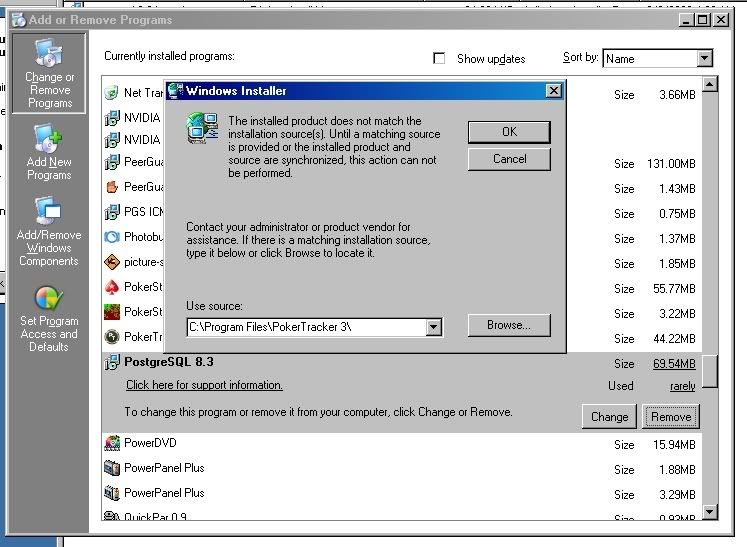
I am trying to do a reinstall of PostgreSQL by first uninstalling the current version. However, I can't even get past the first step at the Add/Remove stage. Whenever I select "Remove", I get the following pop up:
[ img ]
I looked for other places where I might find an installation source and I could identify one other location, but I received the same pop up. I am logged on as the Administrator of the computer. I don't know what to do, and I don't want to nuke the PostgreSQL directory and clean the registry in order to uninstall. Is that even an option?

Can't remove PostgreSQL through WinXP Add/Remove Programs.
Moderator: Moderators
18 posts
• Page 1 of 2 • 1, 2
Can't remove PostgreSQL through WinXP Add/Remove Programs.
 by 91Jayhawk » Fri Feb 20, 2009 6:29 pm
- 91Jayhawk
- Posts: 13
- Joined: Mon Dec 01, 2008 6:43 pm
Re: Can't remove PostgreSQL through WinXP Add/Remove Programs.
by kraada » Sat Feb 21, 2009 10:14 am
The uninstaller for PostgreSQL shouldn't actually delete the PostgreSQL directory. Try using C:\Program Files\PostgreSQL\ as your source.
- kraada
- Moderator
- Posts: 54430
- Joined: Wed Mar 05, 2008 2:32 am
- Location: NY
Re: Can't remove PostgreSQL through WinXP Add/Remove Programs.
by 91Jayhawk » Sat Feb 21, 2009 2:23 pm
I tried using C:\Program Files\PostgreSQL\ as my source, but that didn't work. Here's what I did, step by step.
[ img ]
From the above screen, I clicked on Browse. It then gives me this screen.
[ img ]
From the above screen, I then navigate to C:\Program Files\PostgreSQL\ and I get this screen.
[ img ]
From the above screen, I then click on Open and I get this screen.
[ img ]
From the above screen, I click on OK and I get this message.
[ img ]
It seems to be looking for the file postgresql-8.3-int.msi so I copy that file from the PT directory to the C:\Program Files\PostgreSQL\ directory as seen here:
[ img ]
From the above screen, I click on Open and I get this message:
[ img ]
From the above screen, it looks like it wants me to navigate to a directory where all the install files are located, so I navigate to that directory:
[ img ]
From the above screen, I click on Open and I get this:
[ img ]
From the above screen, I click on OK and I get the same message as before:
[ img ]
Since that didn't work, I search my computer for all other instances of the file postgresql-8.3-int.msi (I look in temporary install directories and any other directories where that file may be.) I then go through the same procedure as above and I get the same results.
Any other ideas on how to uninstall PostgreSQL?
[ img ]
From the above screen, I clicked on Browse. It then gives me this screen.
[ img ]
From the above screen, I then navigate to C:\Program Files\PostgreSQL\ and I get this screen.
[ img ]
From the above screen, I then click on Open and I get this screen.
[ img ]
From the above screen, I click on OK and I get this message.
[ img ]
It seems to be looking for the file postgresql-8.3-int.msi so I copy that file from the PT directory to the C:\Program Files\PostgreSQL\ directory as seen here:
[ img ]
From the above screen, I click on Open and I get this message:
[ img ]
From the above screen, it looks like it wants me to navigate to a directory where all the install files are located, so I navigate to that directory:
[ img ]
From the above screen, I click on Open and I get this:
[ img ]
From the above screen, I click on OK and I get the same message as before:
[ img ]
Since that didn't work, I search my computer for all other instances of the file postgresql-8.3-int.msi (I look in temporary install directories and any other directories where that file may be.) I then go through the same procedure as above and I get the same results.
Any other ideas on how to uninstall PostgreSQL?
- 91Jayhawk
- Posts: 13
- Joined: Mon Dec 01, 2008 6:43 pm
Re: Can't remove PostgreSQL through WinXP Add/Remove Programs.
by kraada » Sat Feb 21, 2009 4:03 pm
What happens if you try and reinstall with an installer file on top of your current installation? That might repair the current broken installation and then you can remove it afterwards.
- kraada
- Moderator
- Posts: 54430
- Joined: Wed Mar 05, 2008 2:32 am
- Location: NY
Re: Can't remove PostgreSQL through WinXP Add/Remove Programs.
by 91Jayhawk » Sat Feb 21, 2009 4:22 pm
I will give that a try.
- 91Jayhawk
- Posts: 13
- Joined: Mon Dec 01, 2008 6:43 pm
Re: Can't remove PostgreSQL through WinXP Add/Remove Programs.
by 91Jayhawk » Sat Feb 21, 2009 5:26 pm
I tried reinstalling postgreSQL on top of the current version and this is what happened.
[ img ]
After I clicked on Install, I received this message:
[ img ]
After reading that message, it just puts me in a circle. I can't remove PostgreSQL through WinXP's Add/Remove Programs, and I can't install over the current application without being directed back to WinXP's Add/Remove Programs. Now what?
[ img ]
After I clicked on Install, I received this message:
[ img ]
After reading that message, it just puts me in a circle. I can't remove PostgreSQL through WinXP's Add/Remove Programs, and I can't install over the current application without being directed back to WinXP's Add/Remove Programs. Now what?
- 91Jayhawk
- Posts: 13
- Joined: Mon Dec 01, 2008 6:43 pm
Re: Can't remove PostgreSQL through WinXP Add/Remove Programs.
by 91Jayhawk » Sat Feb 21, 2009 6:26 pm
OK, I tried something different. First I went to WinXP's Add/Remove Programs and selected PostgreSQL.
[ img ]
From the above screen, I clicked on "Click here for support information." I then received this screen.
[ img ]
From the above screen, I clicked on Repair and it appeared that PostgreSQL was reinstalling.
[ img ]
Then, all of a sudden, I received this message.
[ img ]
I clicked OK to Terminate and things just seemed to hang until I received this message:
[ img ]
I then clicked on Retry (I have all administrative rights). Things appeared to hang again and I received this message again.
[ img ]
I then clicked OK, things hung, and again I received the same message in an endless circle. The reason I want to uninstall PostgreSQL and then reinstall is because I have recently been receiving this message when I try to start PostgreSQL:
[ img ]
Now what? Any ideas?
[ img ]
From the above screen, I clicked on "Click here for support information." I then received this screen.
[ img ]
From the above screen, I clicked on Repair and it appeared that PostgreSQL was reinstalling.
[ img ]
Then, all of a sudden, I received this message.
[ img ]
I clicked OK to Terminate and things just seemed to hang until I received this message:
[ img ]
I then clicked on Retry (I have all administrative rights). Things appeared to hang again and I received this message again.
[ img ]
I then clicked OK, things hung, and again I received the same message in an endless circle. The reason I want to uninstall PostgreSQL and then reinstall is because I have recently been receiving this message when I try to start PostgreSQL:
[ img ]
Now what? Any ideas?
- 91Jayhawk
- Posts: 13
- Joined: Mon Dec 01, 2008 6:43 pm
Re: Can't remove PostgreSQL through WinXP Add/Remove Programs.
by 91Jayhawk » Sat Feb 21, 2009 9:23 pm
Just a followup. I opened up the MS Event Viewer (eventvwr.msc) to see if I could get any more information. I get the following screen.
[ img ]
As you can see, there are PostgreSQL errors all over the place and there are 4 entries per occurrence. I pick a random occurrence and I click on all 4 entries which gives me the following information.
[ img ]
The above seems to be important. "PANIC: could not open control file "global/pg_control": Permission denied." What does it mean? I think that might be the problem, which then results in the following.
[ img ]
[ img ]
[ img ]
Any ideas on how to fix this - ideas on how to start, repair, or uninstall PostgreSQL?
[ img ]
As you can see, there are PostgreSQL errors all over the place and there are 4 entries per occurrence. I pick a random occurrence and I click on all 4 entries which gives me the following information.
[ img ]
The above seems to be important. "PANIC: could not open control file "global/pg_control": Permission denied." What does it mean? I think that might be the problem, which then results in the following.
[ img ]
[ img ]
[ img ]
Any ideas on how to fix this - ideas on how to start, repair, or uninstall PostgreSQL?
- 91Jayhawk
- Posts: 13
- Joined: Mon Dec 01, 2008 6:43 pm
Re: Can't remove PostgreSQL through WinXP Add/Remove Programs.
by WhiteRider » Sun Feb 22, 2009 5:39 am
Was postgres running ok before you started the uninstall?
Did you stop the postgres service before trying to uninstall?
I'll get one of our postgres experts to take a look at this thread.
Did you stop the postgres service before trying to uninstall?
I'll get one of our postgres experts to take a look at this thread.
- WhiteRider
- Moderator
- Posts: 54025
- Joined: Sat Jan 19, 2008 7:06 pm
- Location: UK
Re: Can't remove PostgreSQL through WinXP Add/Remove Programs.
by WhiteRider » Sun Feb 22, 2009 10:11 am
You could try booting into safe mode and then doing the uninstall - I'm not sure if you will be able to do it, but give it a go.
To boot into safe mode, click Start --> Run type “msconfig” and hit OK. Under the “Boot.ini” tab, check “Safe boot” and “Network”. Click Apply, then OK, and restart your computer. It will boot automatically into safe mode.
Once the uninstall has finished, go back into the msconfig window again as directed previously, and uncheck the “Safe boot” checkbox. Then reboot your computer.
To boot into safe mode, click Start --> Run type “msconfig” and hit OK. Under the “Boot.ini” tab, check “Safe boot” and “Network”. Click Apply, then OK, and restart your computer. It will boot automatically into safe mode.
Once the uninstall has finished, go back into the msconfig window again as directed previously, and uncheck the “Safe boot” checkbox. Then reboot your computer.
- WhiteRider
- Moderator
- Posts: 54025
- Joined: Sat Jan 19, 2008 7:06 pm
- Location: UK
18 posts
• Page 1 of 2 • 1, 2
Return to PostgreSQL [Read Only]
Who is online
Users browsing this forum: No registered users and 0 guests